Playground Project • AI-Augmented Development
Company Finder Dashboard
An exploratory project demonstrating AI-augmented design workflow: from concept to deployed prototype in 8 weeks, building outside traditional design system constraints with full-stack execution.
AI Tools
0→1 Product
Full-Stack
8 Weeks
Timeline
8 Weeks
Iterative, Part-Time
Role
Product Designer
0→1 Ownership
Scope
End-to-End
Strategy to Deploy
Stack
6 Tools
AI-Augmented
What This Project Demonstrates
—
AI-augmented design workflow (Claude, GPT-4, Magic Patterns)
—
Design outside design system constraints
—
Systems thinking (data model, API design, UX flow)
—
Strategic architecture decisions (FastAPI, scoring algorithm)
—
Full-stack execution capability (design → code → deploy)
—
0→1 product ownership in exploratory environment
Built With
This project demonstrates effective AI collaboration: I made all strategic decisions (architecture, signals, scoring, UX) while using AI tools to accelerate execution 2-3x.

Claude
AI for scoring logic

Magic Patterns
UI prototyping

Supabase
Database backend

React
Fronted framework

FastApI
API endpoints

Vercel
Deployment
Claude
AI for scoring logic
Magic Patterns
UI prototyping
Supabase
Database backend
React
Fronted framework
FastApI
API endpoints
Vercel
Deployment
Claude
AI for scoring logic
Magic Patterns
UI prototyping
Supabase
Database backend
React
Fronted framework
FastApI
API endpoints
Vercel
Deployment
View Live Demo
→
Development Evolution
8 weeks, iterative, part-time
Initial static prototype
→
Re-architected SaaS dashboard
→
Production deployment (Vercel)
The project began as a zero-dependency local prototype to validate the core concept. As UX complexity and filtering needs increased, I recognized the limitations of static architecture and made the strategic decision to re-architect as a FastAPI + React application with a scalable dashboard interface.
Key Product Decision: Re-Architecture
After Week 1, the static prototype revealed critical limitations:
Limitations
✕
No dynamic filtering
✕
No scalable data handling
✕
Limited UX flexibility
After Re-Architecture
✓
Dynamic filtering & real-time updates
✓
Scalable data architecture
✓
Production-style SaaS dashboard UX
✓
Realistic product environment (not static
Decision
Re-architect as FastAPI +
React application
Process: From Validation to Deployment
- Built zero-dependency local web app
- Terminal-based workflow for quick iteration
- Manual filtering with basic dataset
- Validated core problem hypothesis
- Pivoted from static → API-driven system
- Introduced FastAPI backend
- Defined company schema (signals, score, churn)
- Designed dashboard-first UX model
- React + Tailwind frontend implementation
- Dark-mode dashboard UI (#0b0c10)
- Multi-dimensional filtering system
- Table-based data density UX
- AI-assisted development (GPT-4 + Claude)
- Advanced filters + tunable scoring weights
- UI polish (Inter typography, 16px grid)
- Hierarchy + spacing refinement
- Production deployment via Vercel
- Documentation + case study layer
- —Built zero-dependency local web app
- —Terminal-based workflow for quick iteration
- —Manual filtering with basic dataset
- —Validated core problem hypothesis
- —Pivoted from static → API-driven system
- —Introduced FastAPI backend
- —Defined company schema (signals, score, churn)
- —Designed dashboard-first UX model
- —React + Tailwind frontend implementation
- —Dark-mode dashboard UI (#0b0c10)
- —Multi-dimensional filtering system
- —Table-based data density UX
- —AI-assisted development (GPT-4 + Claude)
- —Advanced filters + tunable scoring weights
- —UI polish (Inter typography, 16px grid)
- —Hierarchy + spacing refinement
- —Production deployment via Vercel
- —Documentation + case study layer
The Solution
I built Company Finder to solve my own problem: finding potential design clients efficiently. I needed to filter companies by signals that indicate they might need help—stale website design, recent funding (can afford it), specific company size, growth trajectory—and rank them by fit.
The scoring algorithm considers six signals:
Growth rate (0-50%+ capped and normalized)
Design quality (stale/modern assessment)
Clarity score (0-10 messaging clarity)
Churn indicators (risk signals)
Recent funding (boolean)
Company size (50-1000 employees sweet spot)
Each signal has an adjustable weight to customize the model to different search strategies.
AI-Augmented Product Development
Used AI strategically to accelerate execution while maintaining design-led decision-making.
1
GPT-4
Strategy
Product reasoning, UX logic, architectural planning
2
Magic Patterns
Prototyping
Rapid UI exploration, layout validation
3
React + Tailwind
Frontend
Component assembly & polish
5
Vercel
Ship
Production deployment & testing
AI Role
Execution Accelerator
—
GPT-4 — Product reasoning, UX logic, architectural planning
—
Magic Patterns — Rapid UI exploration, layout validation
—
Claude — Development co-pilot, debugging, code refinement
Designer Role
Decision Maker
—
Product decisions & strategic direction
—
UX strategy & information architecture
—
Systems design & component structure
Design Evolution
From rough prototype to production interface
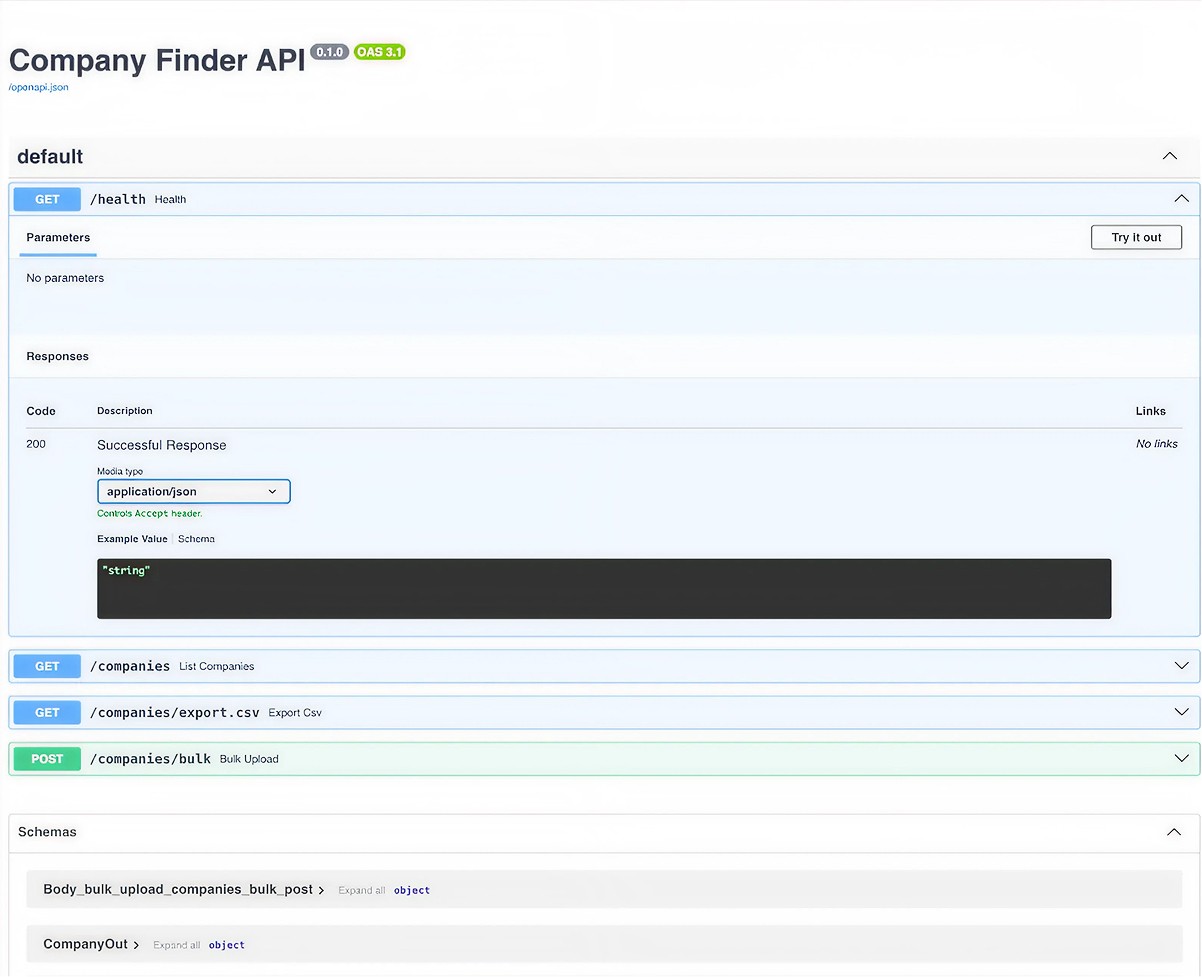
V1: Backend-First
Week 2-3: API Design
FastAPI with auto-generated docs. Validated data model and endpoints (filters, scoring, CSV export) before building UI.
Final Product
A production-ready prototype.
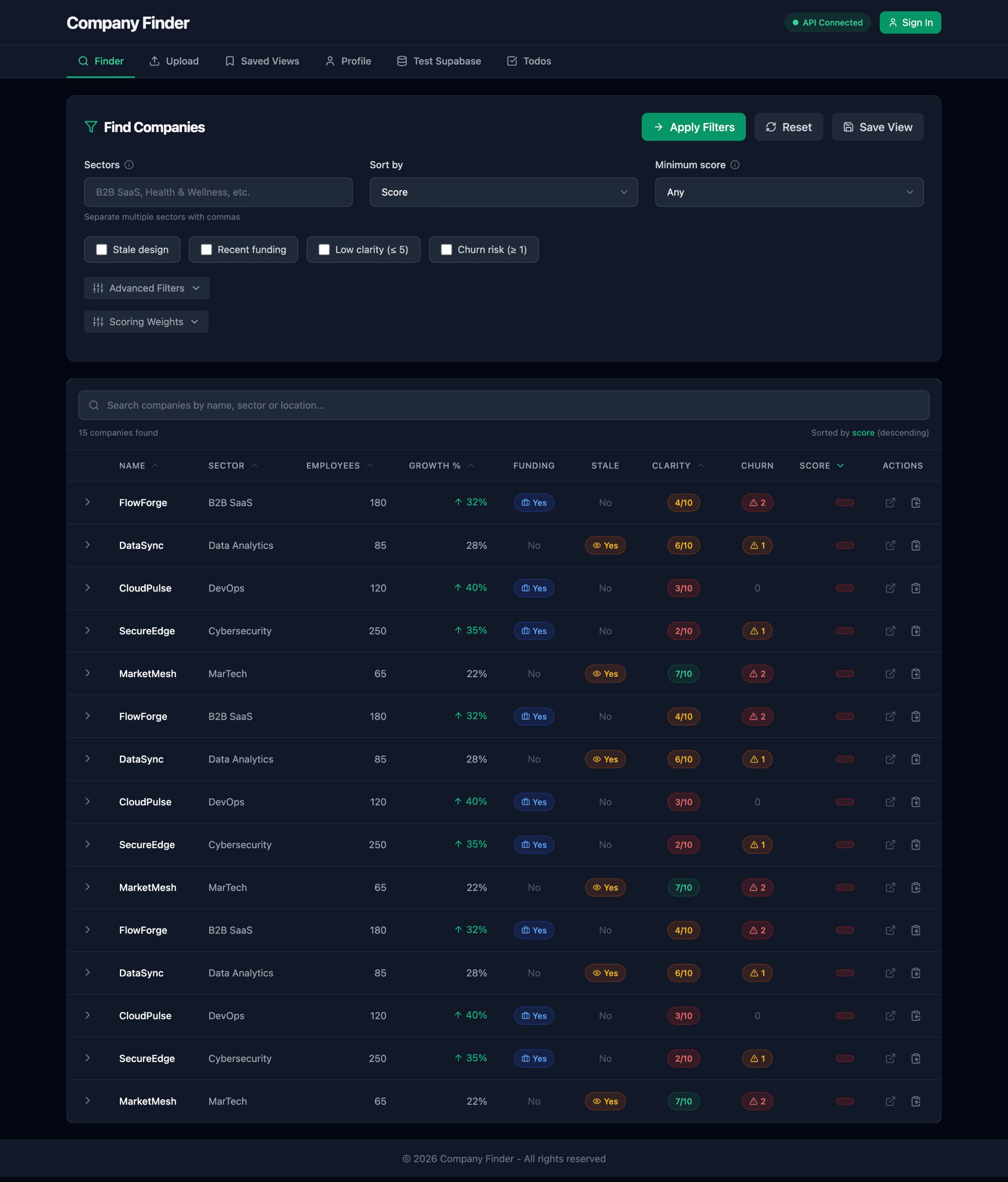
Complete dashboard showing multi-signal filtering and weighted scoring. Built to find companies with stale designs, recent funding, and growth— signals they might need design help.
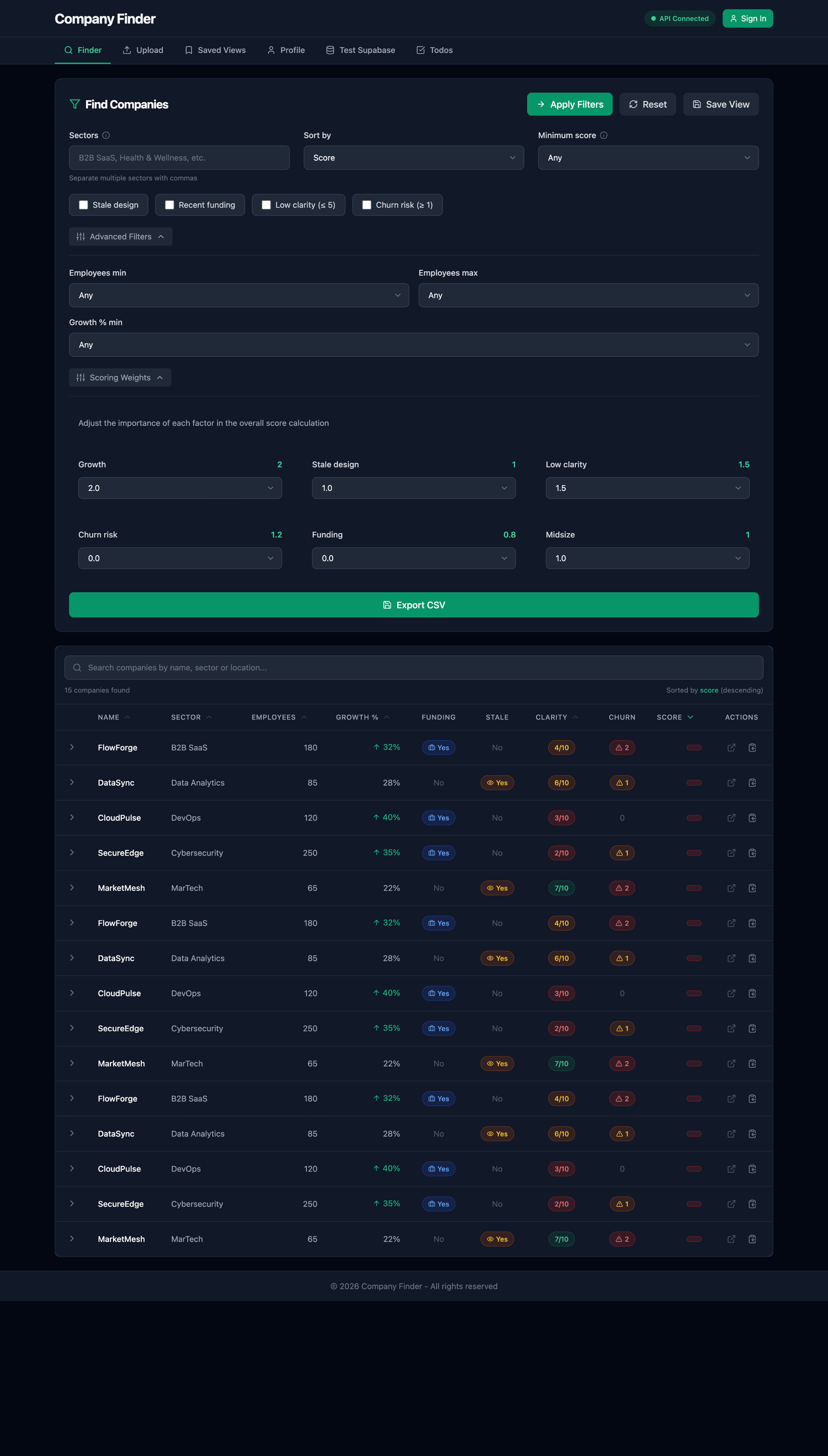
Ranked by Fit
Best potential clients first
Filter by Signals
Stale design, funding, size, growth
Multi-Dimensional Filtering
Filter by sector, size, growth rate, funding status, design quality, and churn risk
Tunable Scoring Model
6 adjustable weights let you customize how signals combine into 0-100 priority score
CSV Import/Export
Upload company data, export filtered results for CRM or outreach tracking
Live Filtering
Results update instantly as you adjust filters—no submit button needed
Design Decisions
Dark Theme for Extended Use
Chose dark mode (#0b0c10 background, #111218 cards) to reduce eye strain during long research sessions. B2B tools should prioritize function over flash.
Information Hierarchy
Filters first → Weights second → Results last. This flow mirrors how I actually researched: broad criteria, then prioritization logic, then ranked list.
Cyan Accent (#14b8a6)
High contrast against dark background, draws attention to interactive elements and scores.
Impact
8 Weeks
Validation → Deploy
0→1 Product
Strategy to Code
Production
Deployed on Vercel
Functional SaaS prototype demonstrating
✓
Systems-oriented product thinking
✓
AI-augmented development workflows
✓
Design-to-code execution capability
✓
0→1 ownership in ambiguous environment
Key Learnings
1.
AI tools are execution accelerators, not strategic decision-makers
Claude and GPT-4 accelerated development 2-3x, but every strategic decision—which signals to use, how to weight them, API architecture, UX flow—required human judgment. AI excels at translating complete specifications into working code but fails at product strategy, UX design, and environment debugging.
2.
Effective AI collaboration requires precise requirements
Clear specifications → fast execution. Example: detailed scoring algorithm spec (clamp, normalize, weighted sum) → working code in 1 prompt. Vague requests → 10+ iterations of refinement. The bottleneck shifted from typing code to defining requirements precisely and validating output critically.
3.
Strategic pivots matter more than individual features
The Week 2 decision to re-architect from static HTML → FastAPI + React was more valuable than any subsequent UI polish. Recognizing architectural limitations early and having the discipline to restart demonstrates systems thinking over feature attachment.
4.
Design outside systems reveals raw problem-solving ability
Building without an existing design system forced fundamental decisions: color psychology for data visualization, typography hierarchy for information density, layout strategy for research workflows. This demonstrates design thinking, not just component assembly.
5.
Deployed prototypes create different learnings than mockups
Production deployment revealed edge cases (malformed CSV uploads, port conflicts, CORS configuration) that static prototypes never would. Building in code and shipping to Vercel validated technical execution capability, not just design craft.
6.
0→1 requires comfort with ambiguity
No PRD, no stakeholders, no existing codebase. Every decision—scope, stack, timeline, features—was mine to make and defend. This exploratory environment mirrors early-stage startup work where designers often operate without traditional guardrails.
Playground Project • AI-Augmented Development
Company Finder Dashboard
An exploratory project demonstrating AI-augmented design workflow: from concept to deployed prototype in 8 weeks, building outside traditional design system constraints with full-stack execution.
AI Tools
0→1 Product
Full-Stack
8 Weeks
Timeline
8 Weeks
Iterative, Part-Time
Role
Product Designer
0→1 Ownership
Scope
End-to-End
Strategy to Deploy
Stack
6 Tools
AI-Augmented
What This Project Demonstrates
—
AI-augmented design workflow (Claude, GPT-4, Magic Patterns)
—
Design outside design system constraints
—
Systems thinking (data model, API design, UX flow)
—
Strategic architecture decisions (FastAPI, scoring algorithm)
—
Full-stack execution capability (design → code → deploy)
—
0→1 product ownership in exploratory environment
Built With
This project demonstrates effective AI collaboration: I made all strategic decisions (architecture, signals, scoring, UX) while using AI tools to accelerate execution 2-3x.
Claude
AI for scoring logic
Magic Patterns
UI prototyping
Supabase
Database backend
React
Fronted framework
FastApI
API endpoints
Vercel
Deployment
Claude
AI for scoring logic
Magic Patterns
UI prototyping
Supabase
Database backend
React
Fronted framework
FastApI
API endpoints
Vercel
Deployment
Claude
AI for scoring logic
Magic Patterns
UI prototyping
Supabase
Database backend
React
Fronted framework
FastApI
API endpoints
Vercel
Deployment
View Live Demo
→
Development Evolution
8 weeks, iterative, part-time
Initial static prototype
→
Re-architected SaaS dashboard
→
Production deployment (Vercel)
The project began as a zero-dependency local prototype to validate the core concept. As UX complexity and filtering needs increased, I recognized the limitations of static architecture and made the strategic decision to re-architect as a FastAPI + React application with a scalable dashboard interface.
Key Product Decision: Re-Architecture
After Week 1, the static prototype revealed critical limitations:
Limitations
✕
No dynamic filtering
✕
No scalable data handling
✕
Limited UX flexibility
After Re-Architecture
✓
Dynamic filtering & real-time updates
✓
Scalable data architecture
✓
Production-style SaaS dashboard UX
✓
Realistic product environment (not static
Decision
Re-architect as FastAPI +
React application
Process: From Validation to Deployment
- Built zero-dependency local web app
- Terminal-based workflow for quick iteration
- Manual filtering with basic dataset
- Validated core problem hypothesis
- Pivoted from static → API-driven system
- Introduced FastAPI backend
- Defined company schema (signals, score, churn)
- Designed dashboard-first UX model
- React + Tailwind frontend implementation
- Dark-mode dashboard UI (#0b0c10)
- Multi-dimensional filtering system
- Table-based data density UX
- AI-assisted development (GPT-4 + Claude)
- Advanced filters + tunable scoring weights
- UI polish (Inter typography, 16px grid)
- Hierarchy + spacing refinement
- Production deployment via Vercel
- Documentation + case study layer
- —Built zero-dependency local web app
- —Terminal-based workflow for quick iteration
- —Manual filtering with basic dataset
- —Validated core problem hypothesis
- —Pivoted from static → API-driven system
- —Introduced FastAPI backend
- —Defined company schema (signals, score, churn)
- —Designed dashboard-first UX model
- —React + Tailwind frontend implementation
- —Dark-mode dashboard UI (#0b0c10)
- —Multi-dimensional filtering system
- —Table-based data density UX
- —AI-assisted development (GPT-4 + Claude)
- —Advanced filters + tunable scoring weights
- —UI polish (Inter typography, 16px grid)
- —Hierarchy + spacing refinement
- —Production deployment via Vercel
- —Documentation + case study layer
The Solution
I built Company Finder to solve my own problem: finding potential design clients efficiently. I needed to filter companies by signals that indicate they might need help—stale website design, recent funding (can afford it), specific company size, growth trajectory—and rank them by fit.
The scoring algorithm considers six signals:
Growth rate (0-50%+ capped and normalized)
Design quality (stale/modern assessment)
Clarity score (0-10 messaging clarity)
Churn indicators (risk signals)
Recent funding (boolean)
Company size (50-1000 employees sweet spot)
Each signal has an adjustable weight to customize the model to different search strategies.
AI-Augmented Product Development
Used AI strategically to accelerate execution while maintaining design-led decision-making.
1
GPT-4
Strategy
Product reasoning, UX logic, architectural planning
2
Magic Patterns
Prototyping
Rapid UI exploration, layout validation
3
React + Tailwind
Frontend
Component assembly & polish
5
Vercel
Ship
Production deployment & testing
AI Role
Execution Accelerator
—
GPT-4 — Product reasoning, UX logic, architectural planning
—
Magic Patterns — Rapid UI exploration, layout validation
—
Claude — Development co-pilot, debugging, code refinement
Designer Role
Decision Maker
—
Product decisions & strategic direction
—
UX strategy & information architecture
—
Systems design & component structure
Design Evolution
From rough prototype to production interface
V1: Backend-First
Week 2-3: API Design
FastAPI with auto-generated docs. Validated data model and endpoints (filters, scoring, CSV export) before building UI.
Final Product
A production-ready prototype.
Complete dashboard showing multi-signal filtering and weighted scoring. Built to find companies with stale designs, recent funding, and growth— signals they might need design help.
Ranked by Fit
Best potential clients first
Filter by Signals
Stale design, funding, size, growth
Multi-Dimensional Filtering
Filter by sector, size, growth rate, funding status, design quality, and churn risk
Tunable Scoring Model
6 adjustable weights let you customize how signals combine into 0-100 priority score
CSV Import/Export
Upload company data, export filtered results for CRM or outreach tracking
Live Filtering
Results update instantly as you adjust filters—no submit button needed
Design Decisions
Dark Theme for Extended Use
Chose dark mode (#0b0c10 background, #111218 cards) to reduce eye strain during long research sessions. B2B tools should prioritize function over flash.
Information Hierarchy
Filters first → Weights second → Results last. This flow mirrors how I actually researched: broad criteria, then prioritization logic, then ranked list.
Cyan Accent (#14b8a6)
High contrast against dark background, draws attention to interactive elements and scores.
Key Learnings
1.
AI tools are execution accelerators, not strategic decision-makers
Claude and GPT-4 accelerated development 2-3x, but every strategic decision—which signals to use, how to weight them, API architecture, UX flow—required human judgment. AI excels at translating complete specifications into working code but fails at product strategy, UX design, and environment debugging.
2.
Effective AI collaboration requires precise requirements
Clear specifications → fast execution. Example: detailed scoring algorithm spec (clamp, normalize, weighted sum) → working code in 1 prompt. Vague requests → 10+ iterations of refinement. The bottleneck shifted from typing code to defining requirements precisely and validating output critically.
3.
Strategic pivots matter more than individual features
The Week 2 decision to re-architect from static HTML → FastAPI + React was more valuable than any subsequent UI polish. Recognizing architectural limitations early and having the discipline to restart demonstrates systems thinking over feature attachment.
4.
Design outside systems reveals raw problem-solving ability
Building without an existing design system forced fundamental decisions: color psychology for data visualization, typography hierarchy for information density, layout strategy for research workflows. This demonstrates design thinking, not just component assembly.
5.
Deployed prototypes create different learnings than mockups
Production deployment revealed edge cases (malformed CSV uploads, port conflicts, CORS configuration) that static prototypes never would. Building in code and shipping to Vercel validated technical execution capability, not just design craft.
6.
0→1 requires comfort with ambiguity
No PRD, no stakeholders, no existing codebase. Every decision—scope, stack, timeline, features—was mine to make and defend. This exploratory environment mirrors early-stage startup work where designers often operate without traditional guardrails.
Impact
8 Weeks
Validation → Deploy
0→1 Product
Strategy to Code
Production
Deployed on Vercel
Functional SaaS prototype demonstrating
✓
Systems-oriented product thinking
✓
AI-augmented development workflows
✓
Design-to-code execution capability
✓
0→1 ownership in ambiguous environment
Playground Project •
AI-Augmented Development
Company Finder Dashboard
An exploratory project demonstrating AI-augmented design workflow: from concept to deployed prototype in 8 weeks, building outside traditional design system constraints with full-stack execution.
AI Tools
0→1 Product
Full-Stack
8 Weeks
Timeline
8 Weeks
Iterative, Part-Time
Role
Product Designer
0→1 Ownership
Scope
End-to-End
Strategy to Deploy
Stack
6 Tools
AI-Augmented
What This Project Demonstrates
—
AI-augmented design workflow (Claude, GPT-4, Magic Patterns)
—
Strategic architecture decisions (FastAPI, scoring algorithm)
—
Design outside design system constraints
—
Systems thinking (data model, API design, UX flow)
—
0→1 product ownership in exploratory environment
Built With
This project demonstrates effective AI collaboration: I made all strategic decisions (architecture, signals, scoring, UX) while using AI tools to accelerate execution 2-3x.
Claude
AI for scoring logic
Magic Patterns
UI prototyping
Supabase
Database backend
React
Fronted framework
FastApI
API endpoints
Vercel
Deployment
Claude
AI for scoring logic
Magic Patterns
UI prototyping
Supabase
Database backend
React
Fronted framework
FastApI
API endpoints
Vercel
Deployment
Claude
AI for scoring logic
Magic Patterns
UI prototyping
Supabase
Database backend
React
Fronted framework
FastApI
API endpoints
Vercel
Deployment
View Live Demo
→
Development Evolution
8 weeks, iterative, part-time
Initial static prototype
→
Re-architected SaaS dashboard
→
Production deployment (Vercel)
The project began as a zero-dependency local prototype to validate the core concept. As UX complexity and filtering needs increased, I recognized the limitations of static architecture and made the strategic decision to re-architect as a FastAPI + React application with a scalable dashboard interface.
Key Product Decision:
Re-Architecture
After Week 1, the static prototype revealed critical limitations:
Limitations
✕
No dynamic filtering
✕
No scalable data handling
✕
Limited UX flexibility
After Re-Architecture
✓
Dynamic filtering & real-time updates
✓
Scalable data architecture
✓
Production-style SaaS dashboard UX
✓
Realistic product environment (not static
Decision
Re-architect as FastAPI +
React application
Process: From Validation to Deployment
- —Built zero-dependency local web app
- —Terminal-based workflow for quick iteration
- —Manual filtering with basic dataset
- —Validated core problem hypothesis
- —Pivoted from static → API-driven system
- —Introduced FastAPI backend
- —Defined company schema (signals, score, churn
- —Designed dashboard-first UX model
- —React + Tailwind frontend implementation
- —Dark-mode dashboard UI (#0b0c10)
- —Multi-dimensional filtering system
- —Table-based data density UX
- —AI-assisted development (GPT-4 + Claude)
- —Advanced filters + tunable scoring weights
- —UI polish (Inter typography, 16px grid)
- —Hierarchy + spacing refinement
- —Production deployment via Vercel
The Solution
I built a functional dashboard that aggregates company data and computes priority scores using a tunable weighted model.
The scoring algorithm considers six signals:
Growth rate (0-50%+ capped and normalized)
Design quality (stale/modern assessment)
Clarity score (0-10 messaging clarity)
Churn indicators (risk signals)
Recent funding (boolean)
Company size (50-1000 employees sweet spot)
Each signal has an adjustable weight to customize the model to different search strategies.
AI-Augmented Product Development
Used AI strategically to accelerate execution while maintaining design-led decision-making.
1
GPT-4
Strategy
Product reasoning, UX logic, architectural planning
2
Magic Patterns
Prototyping
Rapid UI exploration, layout validation
3
React + Tailwind
Frontend
Component assembly & polish
4
FastAPI + Claude
Backend
Scoring logic & API endpoints
5
Vercel
Ship
Production deployment & testing
AI Role
Execution Accelerator
—
GPT-4 — Product reasoning, UX logic, architectural planning
—
Magic Patterns — Rapid UI exploration, layout validation
—
Claude — Development co-pilot, debugging, code refinement
Designer Role
Decision Maker
—
Product decisions & strategic direction
—
UX strategy & information architecture
—
Systems design & component structure
Design Evolution
From rough prototype to production interface
V1: Backend-First
Week 2-3: API Design
FastAPI with auto-generated docs. Validated data model and endpoints (filters, scoring, CSV export) before building UI.
Final Product
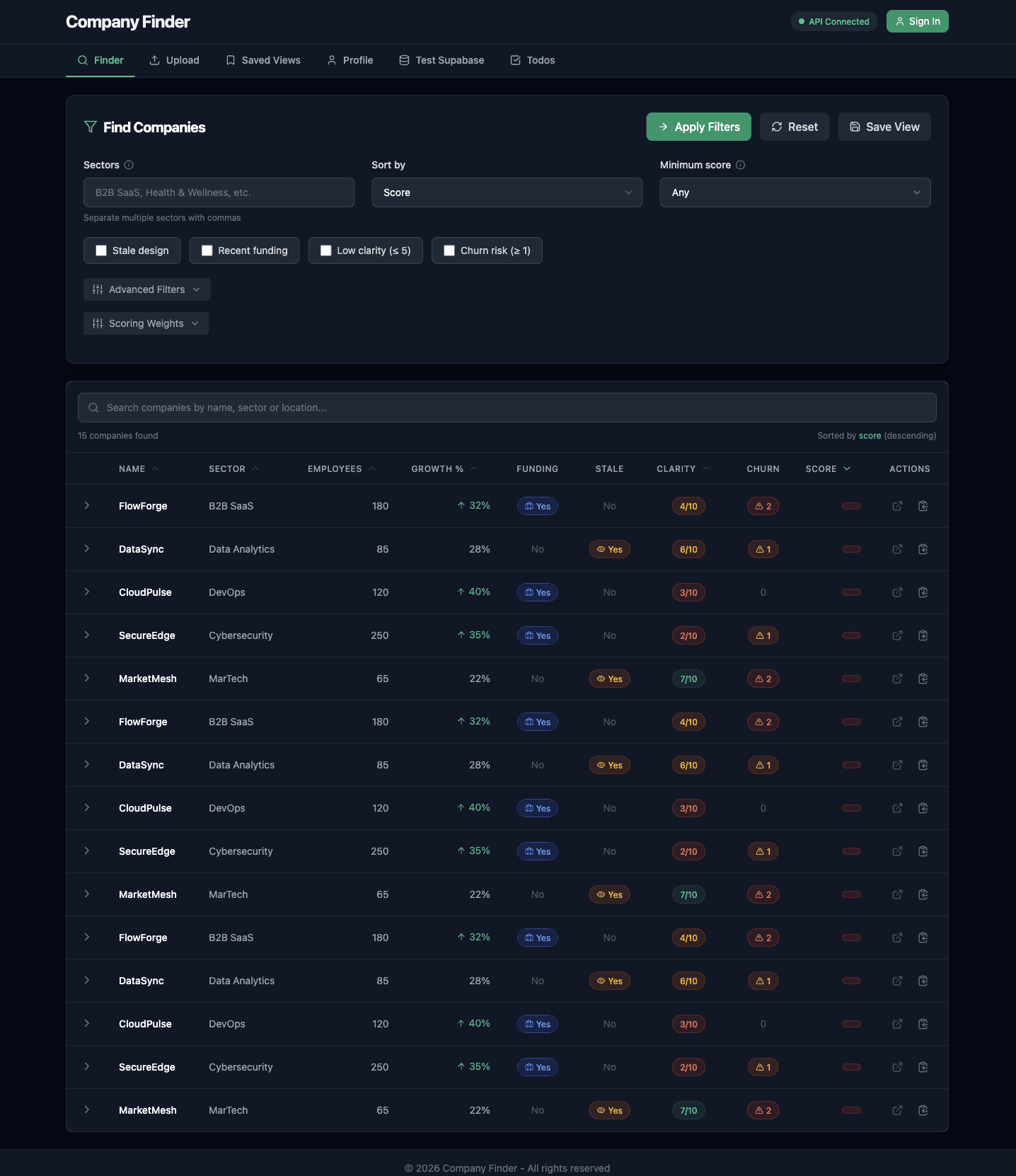
A production-ready prototype.
Complete dashboard showing multi-signal filtering and weighted scoring. Built to find companies with stale designs, recent funding, and growth— signals they might need design help.
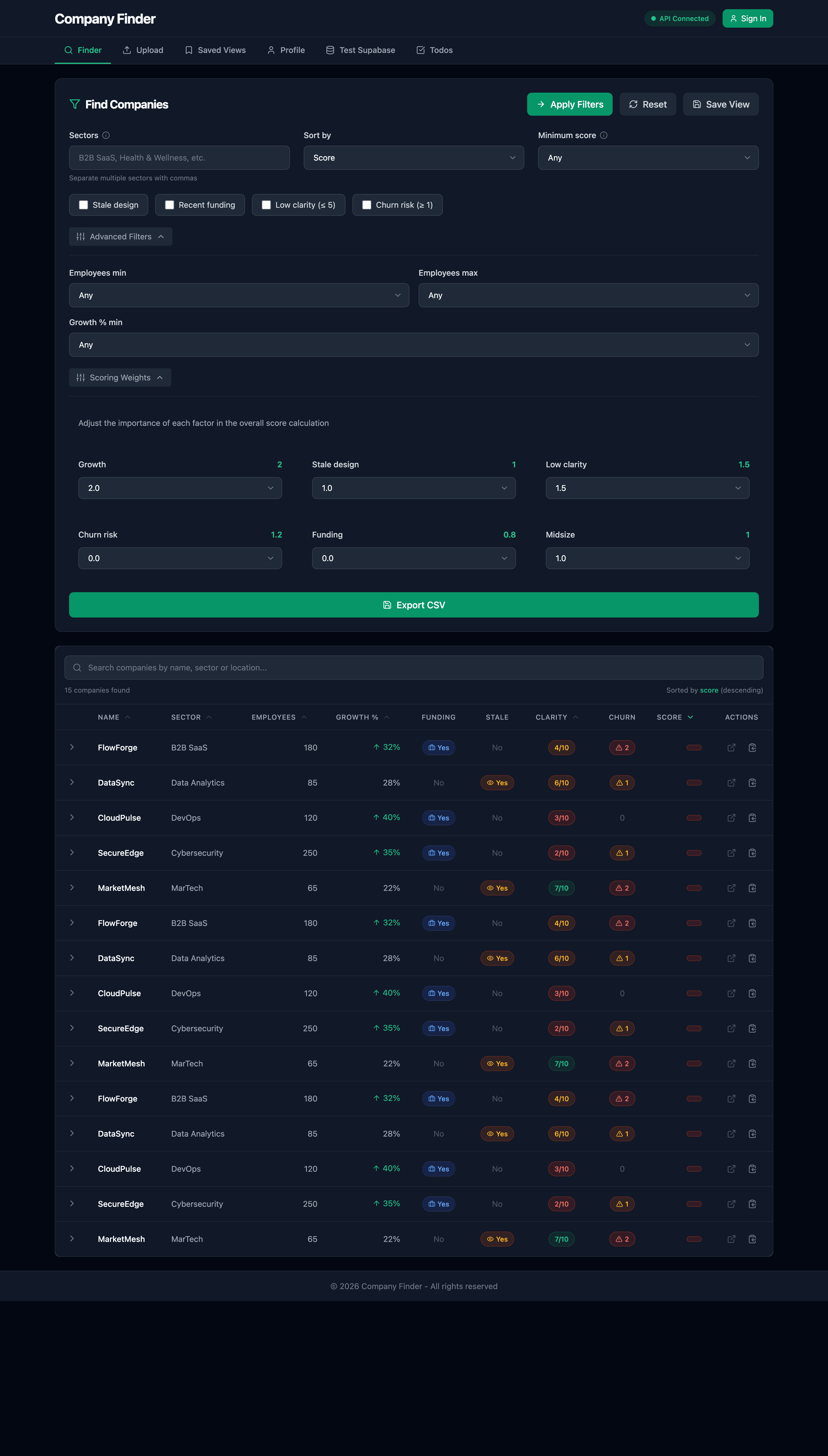
Multi-Dimensional Filtering
Filter by sector, size, growth rate, funding status, design quality, and churn risk
Tunable Scoring Model
6 adjustable weights let you customize how signals combine into 0-100 priority score
CSV Import/Export
Upload company data, export filtered results for CRM or outreach tracking
Live Filtering
Results update instantly as you adjust filters—no submit button needed
Design Decisions
Dark Theme for Extended Use
Chose dark mode (#0b0c10 background, #111218 cards) to reduce eye strain during long research sessions. B2B tools should prioritize function over flash.
Information Hierarchy
Filters first → Weights second → Results last. This flow mirrors how I actually researched: broad criteria, then prioritization logic, then ranked list.
Cyan Accent (#14b8a6)
High contrast against dark background, draws attention to interactive elements and scores.
Key Learnings
1.
AI tools are execution accelerators, not strategic decision-makers
Claude and GPT-4 accelerated development 2-3x, but every strategic decision—which signals to use, how to weight them, API architecture, UX flow—required human judgment. AI excels at translating complete specifications into working code but fails at product strategy, UX design, and environment debugging.
2.
Effective AI collaboration requires precise requirements
Clear specifications → fast execution. Example: detailed scoring algorithm spec (clamp, normalize, weighted sum) → working code in 1 prompt. Vague requests → 10+ iterations of refinement. The bottleneck shifted from typing code to defining requirements precisely and validating output critically.
3.
Strategic pivots matter more than individual features
The Week 2 decision to re-architect from static HTML → FastAPI + React was more valuable than any subsequent UI polish. Recognizing architectural limitations early and having the discipline to restart demonstrates systems thinking over feature attachment.
4.
Design outside systems reveals raw problem-solving ability
Building without an existing design system forced fundamental decisions: color psychology for data visualization, typography hierarchy for information density, layout strategy for research workflows. This demonstrates design thinking, not just component assembly.
5.
Deployed prototypes create different learnings than mockups
Production deployment revealed edge cases (malformed CSV uploads, port conflicts, CORS configuration) that static prototypes never would. Building in code and shipping to Vercel validated technical execution capability, not just design craft.
6.
0→1 requires comfort with ambiguity
No PRD, no stakeholders, no existing codebase. Every decision—scope, stack, timeline, features—was mine to make and defend. This exploratory environment mirrors early-stage startup work where designers often operate without traditional guardrails.
Impact
8 Weeks
Validation → Deploy
0→1 Product
Strategy to Code
Production
Deployed on Vercel
Functional SaaS prototype demonstrating
✓
Systems-oriented product thinking
✓
AI-augmented development workflows
✓
Design-to-code execution capability
✓
0→1 ownership in ambiguous environment